
When I started researching the Hostinger Business plan, I kept running into the same type of review — marketing-heavy, affiliate-driven, and full of bold claims about “blazing fast performance.”
So instead of relying on sales pages, I installed a fresh WordPress website on the Hostinger Business hosting plan and tested it myself.
No CDN. No premium caching plugin. No artificial optimization tricks.
Just the default setup most people actually begin with.
The Exact Setup I Used
To keep this Hostinger Business hosting review realistic, I used:
- Hostinger Business Web Hosting plan
- LiteSpeed server (default configuration)
- PHP 8.3
- Fresh WordPress installation
- Default WordPress theme
- No CDN
- No manual performance optimization
This wasn’t a tuned performance build.
It was the type of installation a beginner would actually run after clicking “Install WordPress.”
Test 1 – Cold Performance (No Cache)
The first test was executed immediately after flushing the server cache.
This simulates the first visitor landing on your website.
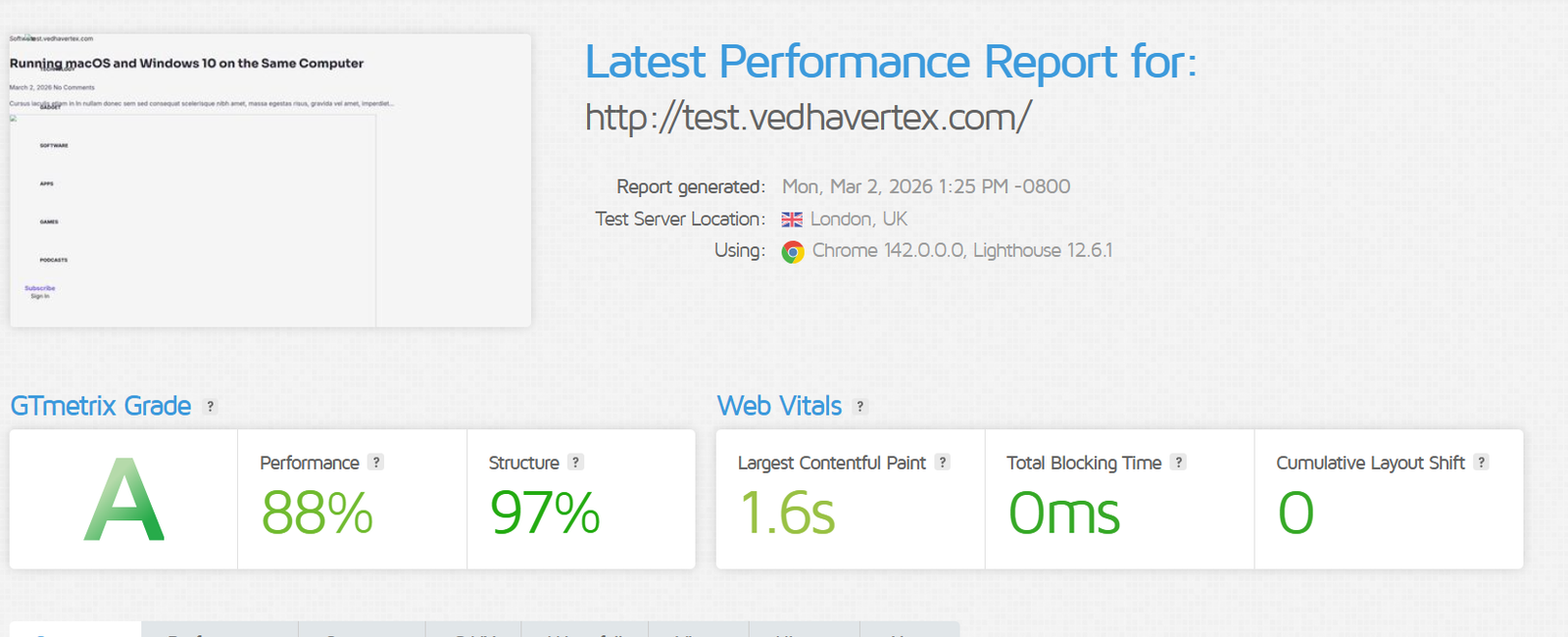
Cold performance result after cache flush.
- Performance Score: 88%
- Structure Score: 97%
- Largest Contentful Paint (LCP): 1.6 seconds
- Time to First Byte (TTFB): ~750ms
- Total Blocking Time: 0ms
- Cumulative Layout Shift: 0
That ~750ms TTFB represents real backend processing:
PHP execution, database queries, and WordPress rendering.
For shared hosting, sub-800ms uncached response time is technically acceptable.
Nothing here was tweaked to inflate numbers.
Test 2 – Warm Performance (LiteSpeed Cache Active)
After visiting the site multiple times to warm the LiteSpeed cache,
I ran the same test again from the same location.
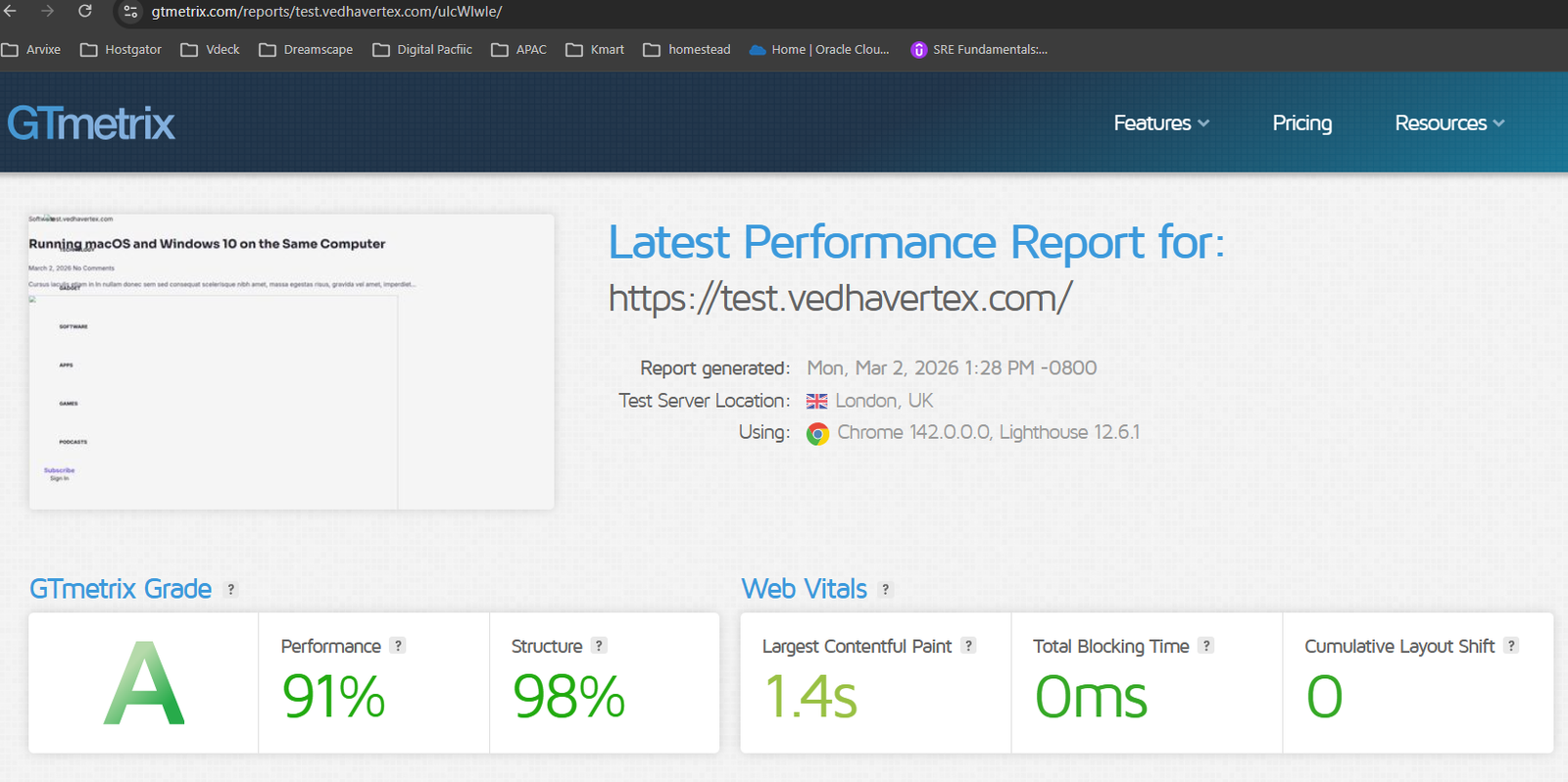
Warm performance result with default LiteSpeed caching enabled.
- Performance Score: 91%
- Structure Score: 98%
- LCP: 1.4 seconds
- Total Blocking Time: 0ms
- CLS: 0
The improvement wasn’t dramatic — but it was consistent.
LiteSpeed simply served cached HTML instead of regenerating the page.
That’s how most repeat visitors will experience your site.
Proof: No Hidden Optimization
I didn’t enable advanced CSS/JS optimization or aggressive caching rules.
Here is the exact server configuration during testing.
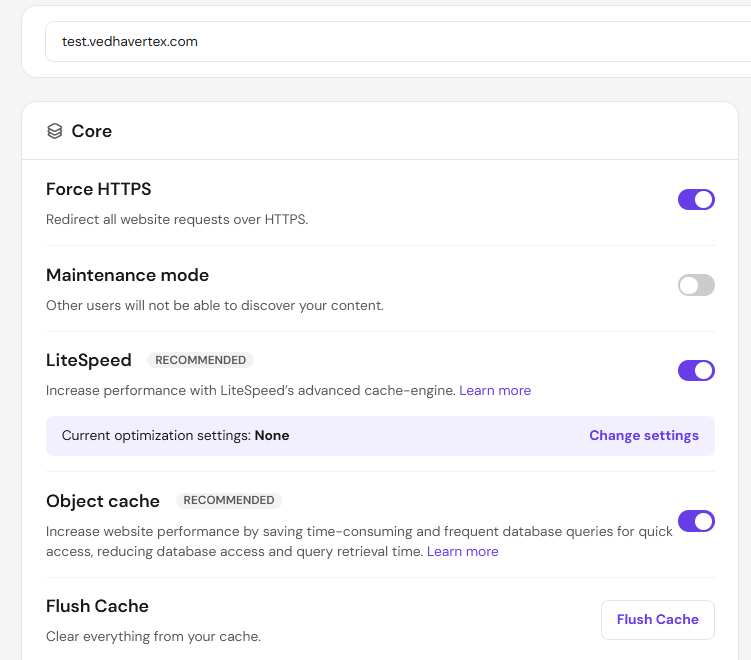
LiteSpeed and Object Cache enabled by default during testing.
- LiteSpeed: Enabled
- Object Cache: Enabled
- Optimization Settings: None configured
- CDN: Disabled
Performance Summary
| Metric | Cold | Warm |
|---|---|---|
| Performance Score | 88% | 91% |
| LCP | 1.6s | 1.4s |
| TTFB | ~750ms | Lower (Cached) |
| Total Blocking Time | 0ms | 0ms |
| CLS | 0 | 0 |
Final Thoughts After Testing
Here’s the honest takeaway from this Hostinger Business hosting review.
It’s not enterprise infrastructure — but it doesn’t claim to be.
For bloggers, affiliate websites, startup landing pages, and small business WordPress sites, the baseline performance is technically solid.
Uncached response times were stable.
Once LiteSpeed caching kicked in, speed improved without any manual configuration.
That matters — because most users won’t spend hours optimizing performance settings.
This article focused purely on speed.
I’ve started a longer-term uptime monitor, and I’ll publish a separate 30-day reliability review once that data is complete.
If your main question is “Is Hostinger Business hosting fast enough for a new WordPress site?” — based on real testing, yes.