
When I created my first website, I was completely lost with web hosting. I remember thinking, ‘Isn’t a domain enough?’ If you’re feeling the same way, you’re not alone. Web hosting is one of the first essentials you’ll need, but it’s also one of the most confusing parts for beginners.
Simply put, web hosting is the service that allows your website to be accessible on the internet. Without hosting, your website files cannot be stored or delivered to visitors when they try to open your site.
So in this guide, I’ll walk you through web hosting in plain English—what it is, how it works, the types you can choose from, and even what you should budget for hosting in India. I want to make things as simple as possible, based on what I wish I knew when I started.
If you are planning to launch a blog, business website, or online store in 2026, you must know what is web hosting.
Table of Contents
- What Is Web Hosting?
- How Does Web Hosting Work?
- Why Do You Need Web Hosting?
- Types of Web Hosting
- Domain vs Web Hosting
- How to Choose the Right Web Hosting
- Best Web Hosting Providers for Beginners
- How Much Does Web Hosting Cost in India?
- Frequently Asked Questions
- Conclusion
What Is Web Hosting?
Web hosting is a service that stores your website’s files on a server and makes them accessible to users on the internet.
For example, when you visit a website like VedhaVertex.com, the page loads almost instantly in your browser. That’s because the website’s files are stored on a hosting server, which quickly delivers those files to your device whenever you access the site.
In simple words:
Web hosting is the place where your website lives on the internet.
Web Hosting Explained With a Simple Example
Think of a website like a house.
- The domain name is your home address
- The website is the house itself
- Web hosting is the land where the house is built
Without the land (hosting), your house (website) cannot exist online.
Web hosting services provide the technology and infrastructure needed to store website files, manage traffic, and keep websites online 24/7. Hosting companies maintain powerful computers called servers that are connected to the internet all the time. Your website files are stored on these servers.
When visitors open your site, the server delivers the website data instantly. That’s the basic idea of what web hosting is and why it’s essential for every website.
How Does Web Hosting Work?
The process is actually quite simple and involves servers, domains, and browsers all work together behind the scenes..
Let’s break it down step-by-step.
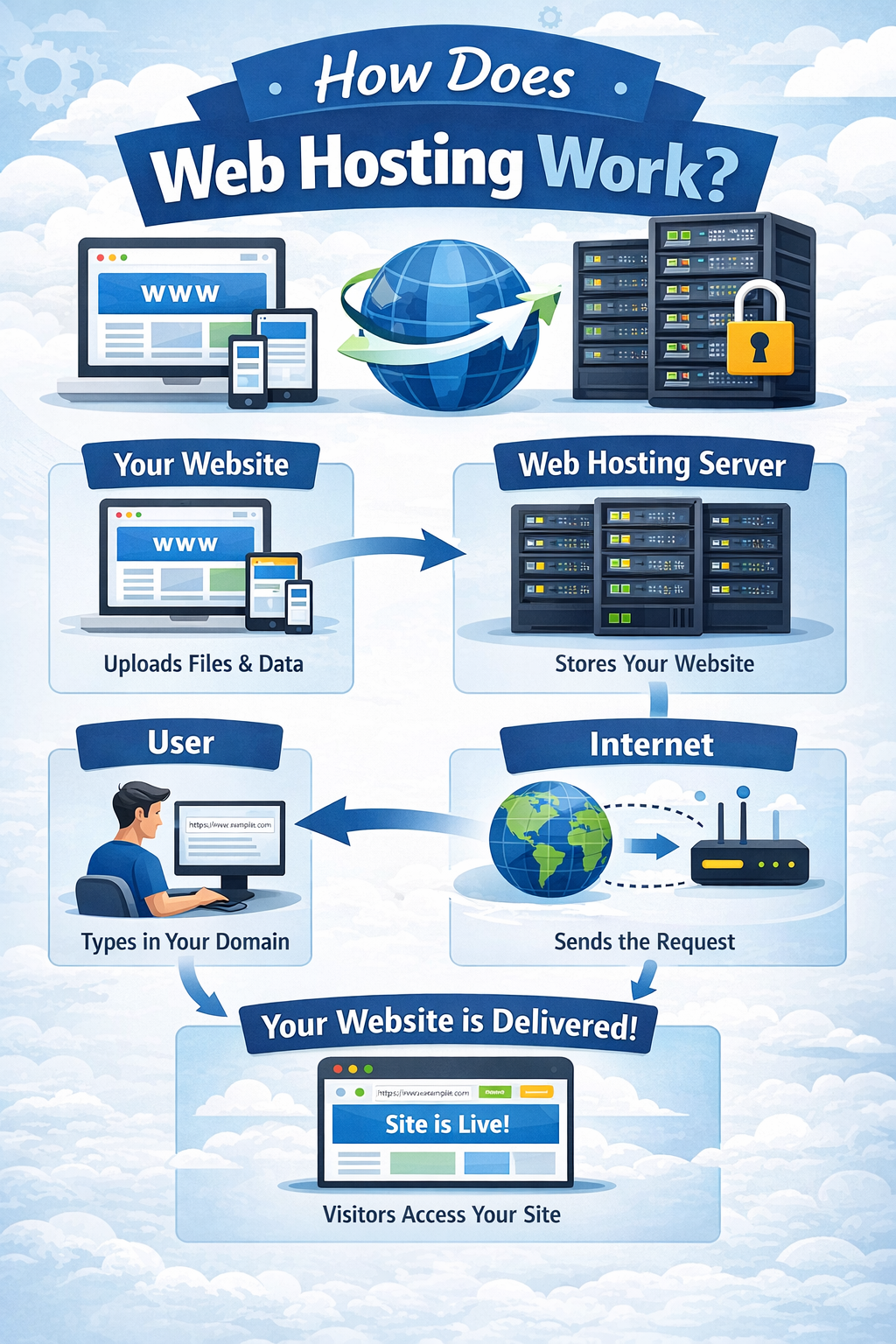
Website Files and Servers
Every website is made of files such as:
- HTML pages
- CSS stylesheets
- Images
- Videos
- JavaScript code
- Databases
All of these need a place to live so people can reach your site. That’s where web hosting comes in. A hosting server is essentially a powerful computer that stores your website’s files and makes them available to visitors across the internet.
When you purchase a hosting plan, your provider gives you space on one of these servers to store everything your website needs. It’s a bit like renting a small plot of land to build your online home.
How Browsers Access Websites
When someone types a website address like (vedhavertex.com) into their browser, this is what happens behind the scenes:
- The user enters the domain name.
- That domain connects to the hosting server where the website lives.
- The server receives the request.
- The server sends the necessary website files.
- The browser puts it all together and displays the website.
Amazingly, this entire process happens in just a few milliseconds!
That’s the basic magic behind how web hosting works.
Role of Hosting Providers
A web hosting provider is responsible for managing the servers where websites are stored. They handle everything from maintaining the physical hardware and ensuring your site stays online, to managing security and providing regular backups. Hosting companies also take care of all the technical maintenance behind the scenes. Thanks to their expertise, anyone can launch a website without having to worry about the complexities of server management or infrastructure.
Server Uptime and Bandwidth
There are two key concepts to understand when it comes to web hosting: uptime and bandwidth.
Uptime is all about reliability. It measures how consistently your hosting server stays online and keeps your website accessible. The best hosting providers typically promise 99.9% uptime, so your site is available to visitors almost all the time.
Bandwidth relates to how much data can flow between your website and its visitors. If you expect a lot of traffic or have a media-rich site, you’ll want higher bandwidth to ensure your pages load quickly and smoothly.
Choosing a reliable hosting provider means your website will stay fast, secure, and easily accessible to people around the world.
Why Do You Need Web Hosting?
Web hosting is essential because it allows your website to exist on the internet.
Without hosting, your website files would remain stored on your local computer, making them inaccessible to other people.
Here are the main reasons why hosting is necessary.
- Your Website Is Accessible Anytime
The main job of web hosting is to make your website available online, 24/7. Hosting servers work around the clock so people can visit your site whenever they want. - Safe Storage for All Your Files
Hosting services give you a secure place to store everything your website needs—pages, images, videos, databases, and scripts. Without this storage, your site simply wouldn’t function. - Handles Visitors and Traffic Spikes
When lots of people visit your site at once, it’s your hosting plan that determines how smoothly everything runs. Good hosting ensures your website can handle high traffic without slowing down or crashing. - Built-in Security and Backups
Most reputable hosting providers include security features like SSL certificates, firewalls, and malware scanning, as well as automatic backups. These measures help keep your site safe from hackers and protect your data from being lost. - Professional Email Addresses
Many hosting plans also let you create custom email addresses using your own domain, like info@yourwebsite.com. This is a big plus for businesses or anyone wanting to look more professional online.
To sum up, web hosting does a lot of heavy lifting behind the scenes, making sure your website stays online, secure, and ready for visitors at all times.
Types of Web Hosting
There are several types of web hosting available, and the best choice for you depends on your website’s size, the amount of traffic you expect, and your budget. Let’s take a closer look at the most common hosting options:
Shared Hosting
If you’re just starting out, shared hosting is usually the go-to option. It’s the most affordable and perfect for beginners. With shared hosting, your website shares server resources—like CPU, memory, and bandwidth—with other sites.
- Pros: It’s cheap, easy to use, and you don’t need any technical know-how.
- Cons: You get limited resources, and your site might slow down if other websites on the same server get busy.
Shared hosting works well for personal blogs, small websites, or anyone building their first site.
VPS Hosting
VPS stands for Virtual Private Server. In this setup, a single physical server is split into several virtual servers, each with its own dedicated resources.
- Pros: Better performance, more control, and resources can be scaled as your site grows.
- Cons: It costs more than shared hosting and you’ll need some technical skills to manage it.
VPS hosting is great for websites that are growing and getting a moderate amount of traffic.
Dedicated Hosting
With dedicated hosting, you get an entire server all to yourself.
- Pros: You’ll have maximum performance, full control, and top-notch security.
- Cons: It’s expensive, and you’ll need to know how to manage a server or have someone to do it for you.
This option is best for large websites, enterprises, or platforms with high traffic.
Cloud Hosting
Cloud hosting uses a network of servers that work together, rather than relying on just one. This setup makes your site more reliable and scalable.
- Pros: Easily scales with your needs, very reliable, and can handle sudden traffic spikes without trouble.
- Cons: Pricing can be unpredictable, and the setup may be a bit more complex.
Cloud hosting is quickly becoming one of the most popular choices, especially in 2026.
Managed WordPress Hosting
If you’re running a WordPress site, managed WordPress hosting might be the perfect fit. The provider takes care of all the technical stuff—like updates, security, backups, and performance tweaks—so you can focus on your content.
- Pros: Optimized for WordPress, faster speeds, and automatic maintenance.
This type of hosting is ideal for WordPress bloggers and businesses who want a hassle-free experience.
Choosing the right hosting comes down to what your website needs now—and what you expect as it grows.
Domain vs Web Hosting
Many beginners confuse domain vs web hosting, but they are two different things.
What Is a Domain?
Many beginners often confuse domain names and web hosting, but they are two different parts of a website. To launch a website successfully, you need both a domain name and web hosting working together.
What Is a Domain?
A domain name is the address of your website on the internet. It is what people type into their browser to visit your website.
For example, when someone types:
- Google → google.com
- Amazon → amazon.com
The domain name helps users easily find your website without needing to remember complex IP addresses.
Think of a domain name like your home address. It tells people where your website is located on the internet.
What Is Web Hosting?
Web hosting is the service that stores your website’s files, images, and content on a server so they can be accessed online.
When someone enters your domain name in a browser, the hosting server delivers your website’s files and displays the site to the visitor.
In simple terms:
- Domain → Your website’s address
- Hosting → The place where your website files are stored
You can think of it like this:
- The domain name is the address of a house.
- The web hosting server is the actual house where everything is stored.
Both are required for a website to work properly. Without hosting, your website has nowhere to store its files, and without a domain, visitors would have no easy way to find your website.
Domain vs Web Hosting Comparison
| Feature | Domain | Web Hosting |
|---|---|---|
| Purpose | Website address | Stores website files |
| Example | example.com | Hosting server |
| Needed for website | Yes | Yes |
Both are required to launch a website.
You need buy a domain first , then connect it to your hosting server.
How to Choose the Right Web Hosting
Choosing the right web hosting provider is one of the most important decisions when building a website. Your hosting directly affects your website’s speed, security, and overall performance. A good hosting service ensures your website stays online, loads quickly, and grows smoothly as your traffic increases.
Below are the most important factors you should consider before selecting a hosting provider.
1. Uptime Guarantee
One of the first things you should check when choosing a hosting provider is the uptime guarantee.
Most reliable hosting companies promise 99.9% uptime, which means your website will be online almost all the time. In simple terms, it allows only a very small amount of downtime during a month or year.
High uptime is important because when your website goes offline, visitors cannot access it. Even short periods of downtime can result in lost visitors, missed business opportunities, and damage to your website’s credibility.
Simply put, higher uptime means your website remains available to users consistently.
2. Speed and Performance
Website speed plays a major role in user experience and search engine rankings. Visitors expect websites to load quickly, and slow websites often lead to higher bounce rates.
Fast hosting improves:
- User experience
- SEO rankings
- Conversion rates
When selecting a hosting provider, look for features like SSD storage, optimized servers, and CDN (Content Delivery Network) support, as these technologies help websites load faster.
3. Security Features
Website security is another critical factor when choosing hosting.
A good hosting provider should include important security features such as:
- SSL certificates
- Malware scanning and protection
- Firewalls
- Automated backups
These features help protect your website from cyber threats and ensure that your visitors’ data remains safe.
4. Customer Support
If you are a beginner, you may need assistance while setting up or managing your website.
That’s why reliable customer support is essential. Choose a hosting provider that offers 24/7 support through live chat, email, or phone.
Quick and helpful support can save you a lot of time when facing technical issues.
5. Scalability
As your website grows, your hosting needs may also increase.
A good hosting provider should allow you to upgrade your hosting plan easily without causing downtime or performance issues. This flexibility ensures your website can handle increased traffic as it grows.
6. Pricing
Hosting prices can vary depending on the features and services offered.
Beginners should look for affordable hosting that provides reliable performance, good support, and essential features. While low pricing can be attractive, it’s important to balance cost with quality and reliability.
Best Web Hosting Providers for Beginners
Several hosting providers are popular among beginners because they offer affordable plans and easy setup.
Here are some widely used options.
Bluehost
Bluehost is one of the most well-known hosting providers for beginners. It is officially recommended by WordPress and is widely used by bloggers and small website owners.
One of the main reasons beginners choose Bluehost is its simple setup process. You can register a domain, install WordPress, and launch your website in just a few steps.
Key features include:
- Free domain name for the first year
- One-click WordPress installation
- Free SSL certificate
- 24/7 customer support
Because of its beginner-friendly dashboard and reliable performance, Bluehost is often recommended for people starting their first website.
Hostinger
Hostinger is known for offering very affordable hosting plans with strong performance. It has become extremely popular among beginners, bloggers, and small businesses.
Hostinger uses its own custom control panel called hPanel, which is simple and easy to use even for people with no technical experience.
Key features include:
- Very low-cost hosting plans
- Fast loading speeds with SSD storage
- Free SSL certificate
- Beginner-friendly control panel
- Global data centers for better performance
I would suggest one of the best budget hosting providers for beginners.
SiteGround
SiteGround is known for its excellent performance, strong security features, and reliable customer support.
Although it is slightly more expensive than some other beginner hosting providers, it offers high-quality hosting services that many professionals trust.
Key features include:
- Fast website performance
- Advanced security tools
- Managed WordPress hosting
- Excellent customer support
- Daily backups
GoDaddy
GoDaddy is one of the largest domain registrars and also provides hosting services for beginners.
Many people choose GoDaddy because they can buy a domain and hosting in the same place, making website setup more convenient.
Key features include:
- Easy domain and hosting management
- Beginner-friendly website builder
- 24/7 customer support
- Multiple hosting plans for different needs
GoDaddy is often used by beginners who want a well-known brand with simple website setup tools.
How Much Does Web Hosting Cost in India?
Web hosting prices in India vary depending on the type of hosting and provider.
Here is a rough estimate.
Shared Hosting
₹150 – ₹400 per month
Best for beginners and small websites.
VPS Hosting
₹800 – ₹3000 per month
Suitable for growing websites.
Dedicated Hosting
₹6000 – ₹20000 per month
Used by large businesses and high-traffic websites.
Cloud Hosting
₹500 – ₹5000 per month depending on usage.
Many hosting companies offer discounted plans for the first year, making hosting affordable for beginners.
Frequently Asked Questions About Web Hosting
Do I need web hosting to create a website?
Yes. If you want your website to be accessible online, you must use web hosting. Hosting stores your website files and makes them available to internet users.
Can I get free web hosting?
Yes, some platforms offer free hosting. However, free hosting often comes with limitations such as ads, slower performance, and restricted resources.
Paid hosting provides better reliability and performance.
Is web hosting the same as domain?
No. A domain name is the address of your website, while web hosting stores your website files.
Both are required to launch a website.
Which hosting is best for beginners?
Shared hosting is usually the best web hosting for beginners because it is affordable and easy to manage.
As your website grows, you can upgrade to VPS or cloud hosting.
Can I change hosting providers later?
Yes. You can migrate your website to a different hosting provider at any time.
Most hosting companies even offer free website migration services.
Conclusion
Now that you know what web hosting is, launching your own website feels a lot less daunting.
If you’re starting your first blog or website, shared hosting is usually the best place to begin—it’s affordable, easy to set up, and simple to manage.
As your site grows, you can always upgrade to VPS, cloud, or dedicated hosting to get more power and flexibility.
So, whether you’re planning to start a blog, launch a business website, or open an online store in 2026, picking the right web hosting provider is the crucial first step to building your online presence.